
Can Claude do a social media manager’s job? I spent three weeks trying to answer that honestly, and the short version is this: it cannot run your account, but it can do the single most tedious part of the job faster than you can. An Instagram content audit that used to eat a full working day now takes me about twenty minutes.
This is the exact Instagram content audit stack, the exact prompts, and an honest list of what it gets wrong. If you manage social for a brand or you are a freelancer trying to take on more clients without hiring, this is the workflow.

What this guide covers
- The honest answer to the hook question
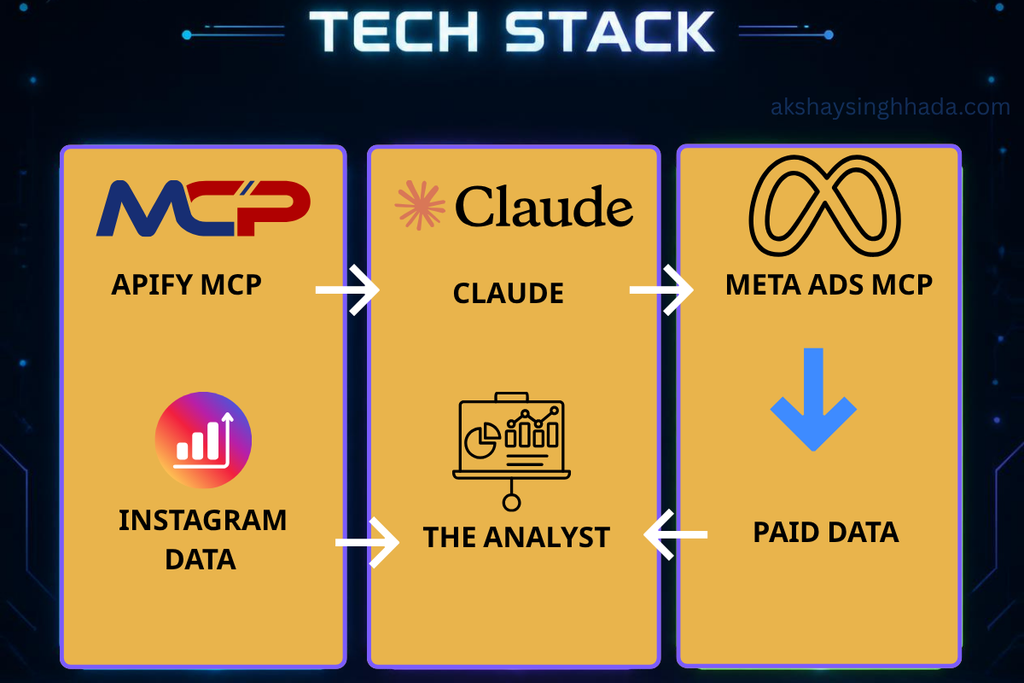
- The Instagram content audit stack
- The six-step Instagram content audit workflow
- The prompts, copy-paste ready
- What this audit genuinely cannot tell you
- The rules I follow on data and cost
- FAQ
The honest answer to the hook question
A social media manager’s job splits into roughly four things: deciding what to say, making it, publishing it, and working out whether it worked.
AI is genuinely bad at the first two. Knowing that a jewellery buyer in Jaipur responds to a mother-daughter framing and not a luxury-lifestyle framing is cultural knowledge, and no model has your brand’s taste. AI is also not the one replying to an angry customer at 11pm.
Where it is genuinely strong is the fourth thing. Finding patterns across ninety posts, cross-referencing captions against engagement, spotting which format quietly stopped working two months ago — that is pattern recognition across structured data, and that is what these models are built for.
So an Instagram content audit is the correct place to start. It is the highest-effort, lowest-creativity part of the role. Automate the part you resent, keep the part you are good at.
The three-part stack for an Instagram content audit
1. Claude with connector support
You need a plan that allows custom connectors. Everything below runs through the Model Context Protocol, the open standard Anthropic published in late 2024 that lets an assistant discover and call external tools. Meta’s own connector arrived later, and PPC Land covered that launch when the ads MCP went into open beta.
2. Apify MCP, for the Instagram data
Apify runs a first-party hosted MCP server that exposes thousands of ready-made scrapers as tools. You connect once and Claude can call any of them in conversation.
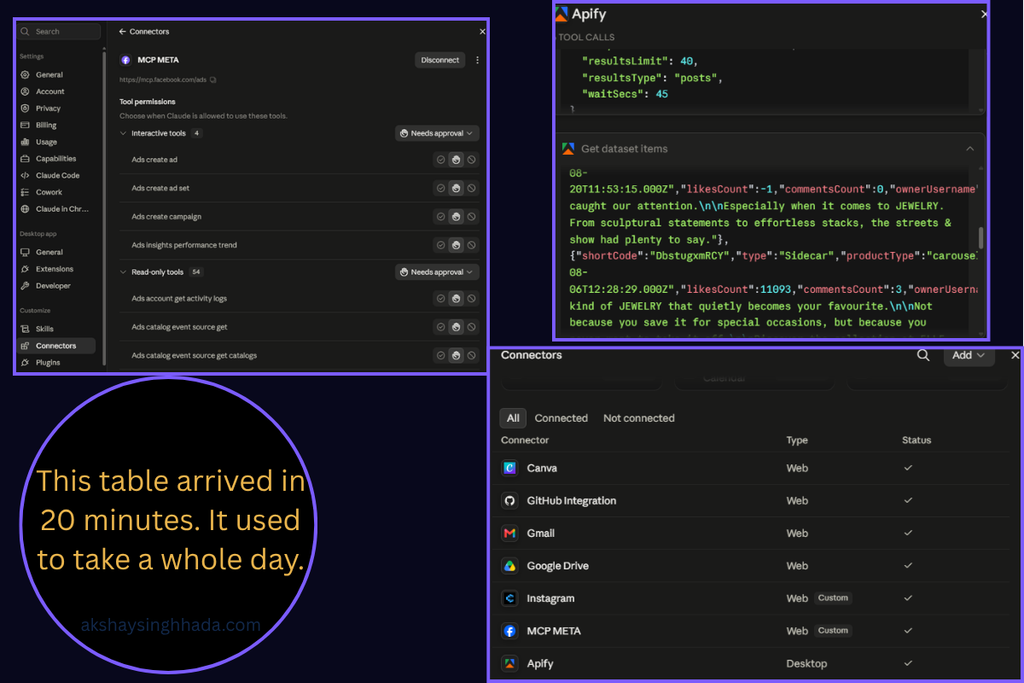
Setup takes about two minutes. In Claude, go to Settings, then Connectors, then Add custom connector, and use https://mcp.apify.com as the server URL. You authorise through Apify with OAuth — no API token pasting required. Apify’s own MCP documentation walks through both the hosted route and the local npx route if you prefer running it on your own machine.
For an Instagram content audit specifically, the useful Actors return profile data, post-level engagement, hashtag performance and competitor comparison as structured JSON. One of the popular ones exposes eight separate tools covering profile, posts, hashtag search, competitor analysis, location search, comment extraction, business contact and trend tracking.
3. Meta Ads MCP, if you also run paid
This part is optional but it is what turns a decent audit into a useful one. Meta released official AI connectors in open beta on 29 April 2026, with an MCP server at mcp.facebook.com/ads. It authenticates through Meta Business OAuth, so there is no developer app or Marketing API approval queue.
With both connected, Claude can hold your organic performance and your paid performance in the same conversation. That is the comparison almost nobody runs, and it is where the interesting findings live.
The six-step Instagram content audit workflow
Run the Instagram content audit as six separate conversations, not one giant prompt. Long single prompts produce confident summaries that hide the interesting detail.
Step 1 – Pull the raw post data
Every Instagram content audit starts with your own account and the last ninety days. Ask for post URL, date, format, caption, likes, comments and any engagement rate the Actor returns. Ask Claude to give you a plain table before it interprets anything.
Reading the table yourself first matters. You will spot obvious data problems — missing posts, a broken date range — that would otherwise silently poison every conclusion after it.
Step 2 – Group by format and find the real winner
Reels, carousels, single images. Group them, then compare on engagement rate rather than raw likes, because Reels get more reach by default and raw numbers will always flatter them.
The finding that shows up on most accounts I audit: carousels quietly outperform on saves and comments while Reels win on reach. Whether that matters depends on whether you are chasing awareness or intent.
Step 3 – Group by message angle, not by topic
This is the step that produces the insight worth paying for. Ask Claude to read the captions and group posts by the angle they take — problem-first, product-first, founder story, customer proof, education, offer — then show engagement rate per group.
Almost every brand discovers it is over-investing in one angle and under-testing the one that actually performs. You cannot see this by scrolling your own grid, because you already know what each post was meant to do.
Step 4 – Add two or three competitors
Now widen the Instagram content audit to two or three public competitor accounts, same pull and same grouping. You are not looking for what to copy. You are looking for the angle they run constantly that you have never tested, and the angle you both over-use.
Step 5 – Overlay your paid data
This is where the Meta Ads MCP earns its place in an Instagram content audit. Ask Claude to compare the messaging angles winning organically against the angles you are actually funding in paid.
The mismatch is usually embarrassing and always useful. Organic is telling you what your audience responds to, for free, and most accounts are spending money on something else entirely. If you want the deeper version of the paid side of this, I wrote a separate framework on how AI creative production feeds the delivery system.
Step 6 – Turn it into a report someone will read
An Instagram content audit is worthless if nobody reads it. Ask for a one-page summary: three findings, three recommendations, one thing to stop doing. Then ask for the supporting tables underneath.
Do not send the raw output to a client. Read it, delete the two findings that are obviously artefacts of thin data, and put your own judgement on top. The audit is the input to your thinking, not a replacement for it.
Instagram content audit prompts, copy-paste ready
These are deliberately specific. Vague prompts are why people try an Instagram content audit once and conclude the tool is shallow.
Step 1 — raw pull: “Using Apify, pull the last 90 days of posts for the public Instagram account @handle. Return a plain table only: post URL, date, format, first 80 characters of the caption, likes, comments. Do not summarise or interpret anything yet. If any field is unavailable, write NA rather than estimating.”
Step 2 — format analysis: “Using that table, group the posts by format. For each format show post count, median likes, median comments and median engagement rate against follower count. Use median, not mean, so one viral post does not distort it. Flag any format with fewer than 5 posts as too small to judge.”
Step 3 — angle analysis: “Read every caption and assign each post to exactly one messaging angle: problem-first, product-first, founder story, customer proof, education, or offer. Show a table with angle, post count, median engagement rate, and the two best performing post URLs per angle. Then tell me which angle is over-invested and which is under-tested.”
Step 4 — competitor comparison: “Run the same 90-day pull and the same angle grouping for these public accounts: @competitor1, @competitor2. Present one combined table comparing angle mix across all three accounts as a percentage of total posts. Tell me which angle they run consistently that we have not tested.”
Step 5 — paid overlay: “Now pull my active Meta ads for the last 90 days. Group them by the same six messaging angles based on primary text. Show spend and results per angle. Put that beside the organic engagement table and tell me where paid spend and organic performance disagree.”
Step 6 — the report: “Write a one-page audit summary: three findings with the number that supports each, three recommendations with the specific action, and one thing to stop doing. Plain language, no marketing jargon. Then put the supporting tables below the summary.”
Notice the pattern. Every prompt asks for a table of facts and defers interpretation. You want the model retrieving and organising; the judgement stays yours.
What this Instagram content audit genuinely cannot tell you
I am going to spend real space here, because the people selling this workflow on LinkedIn will not.
It does not see your images or videos. This is the big one. The Actors return captions, engagement numbers and metadata as JSON. Claude is reasoning about your words, never your visuals. So when your audit says carousels outperform, it cannot tell you whether that is because of the design, the colour, the model, the product shot or the first-frame hook. Any conclusion about visual creative from this stack is inference, not evidence.
It cannot see private accounts. Public data only, by platform design. If your competitor’s account is private, they are not in your audit.
Nothing runs on a trigger. No event fires when a competitor posts or when a metric drops. You ask, or a schedule asks for you. Anyone describing this as an autonomous monitoring agent is overselling it.
It does not know your business context. An angle with low engagement might be your highest-margin product line. The model has no idea. It optimises for the metric in the table, which is why the last step of the workflow is you editing it.
Instagram content audit rules on data and cost
Two things worth being deliberate about before you scale an Instagram content audit across clients.
Neither one is optional if you are doing this for money rather than for yourself.
Terms of service and privacy. Apify states plainly on its Instagram Actors that you should respect Instagram’s terms of service and applicable data-protection regulation, including GDPR and CCPA. My own rules: I run this on accounts I manage and on public brand accounts, I do not extract or store personal data about individual commenters, and I do not build follower lists of private individuals. Aggregate brand-level performance data is a very different thing from a list of named people, and the second one is where you get into trouble.
Cost. Apify Actors are usage-priced. Popular Instagram Actors run in the region of a few cents per profile report, which is nothing for one audit and adds up quickly if you point it at four hundred competitor handles out of curiosity. Check the pricing on the specific Actor page before you run anything at scale, and set a budget cap on your Apify account.
If you want to inspect what any of these servers actually expose before connecting them, the Apify MCP server repository on GitHub documents the full tool surface, and Apify’s hosted MCP page lets you pick exactly which Actors to expose so your agent is not carrying thousands of unused tools.
FAQ
Can Claude replace a social media manager?
No. An Instagram content audit is analysis, and it can replace the reporting and analysis hours inside the role, which is roughly the part most managers dislike. Creative direction, community management, crisis response and brand judgement stay human.
Do I need to write code for this Instagram content audit?
No. Both connectors authorise through OAuth in the browser. If you prefer running Apify locally there is an npx route, but the hosted server needs no code at all.
Is scraping Instagram legal?
Collecting public data sits in a grey area that depends on your jurisdiction, what you collect and what you do with it. Apify’s own guidance is to respect Instagram’s terms of service and data-protection law. I am not a lawyer, and if you are handling data about identifiable individuals rather than brand-level metrics, get proper advice.
Can it analyse my images and video creative?
Not through this stack. The data returned is text and numbers. You can upload creative directly into a Claude conversation for visual feedback, but that is a separate manual step and not part of the automated audit.
How long does one Instagram content audit take?
About twenty minutes for a single account with two competitors, once the connectors are set up. The first run takes longer because you are learning which Actor returns the fields you want.
Does this work for TikTok or LinkedIn too?
The same workflow applies wherever Apify has an Actor for the platform. The six steps do not change; only the data source does.
The takeaway
The question is not whether AI takes the social media manager’s job. It is which hours of that job you want back.
An Instagram content audit is a day of work that produces findings you already half-suspected. Handing that day to a machine and spending it on the creative instead is not a threat to the role. It is the version of the role worth having.
Connect the two servers, run the six prompts on your own account first, and see what it tells you that you did not know. If it tells you nothing, you were already doing this well.
I have managed ₹1 CR+ in tracked ad spend across Meta and Google Ads, building AI-driven acquisition systems for D2C and B2B brands. I write about measurement and workflow on the blog — including a related piece on tracking social content performance in Google Search. If you want this audit run on your account, get in touch, or read more about how I work.