
For as long as most of us have been doing this job, Search Console was a website tool. You added a domain, proved you owned it, and Google showed you clicks, impressions and queries. Everything outside that domain belonged to somebody else’s dashboard. Google Search Console platform properties just broke that assumption, and if you run paid or organic acquisition for a D2C brand, it changes what you can measure.
Google announced the feature on 7 July 2026 and rolled it out to every Search Console account worldwide on 29 July 2026. Four platforms are supported: Instagram, TikTok, X and YouTube. No website required.

What this guide covers
- What platform properties actually are
- What the data measures, and what it does not
- How to set one up, step by step
- Five ways I use the data
- What it will not do for you
- Why it matters more for Indian D2C brands
- FAQ
What Google Search Console platform properties actually are
Until now, Search Console had two property types. A Domain property covered every subdomain and protocol. A URL prefix property covered one specific path. Both required you to prove control of a domain through DNS records, an HTML file upload or a meta tag.
A platform property is the third type. Instead of a domain, it represents a social or video account. You connect the account through a secure authorisation flow, the same way you would log into any third-party app, and Search Console starts reporting on how the posts in that account perform inside Google.
Google’s own framing in the Search Central announcement is that publishers now reach audiences through many channels beyond their own websites, and they deserve a consolidated view of how all of that content gets discovered. That is the whole idea in one sentence.
Each account is added separately. Four accounts means you repeat the process four times.
What the data measures, and what it does not
This is where most people are going to misread the feature, so let me be blunt.
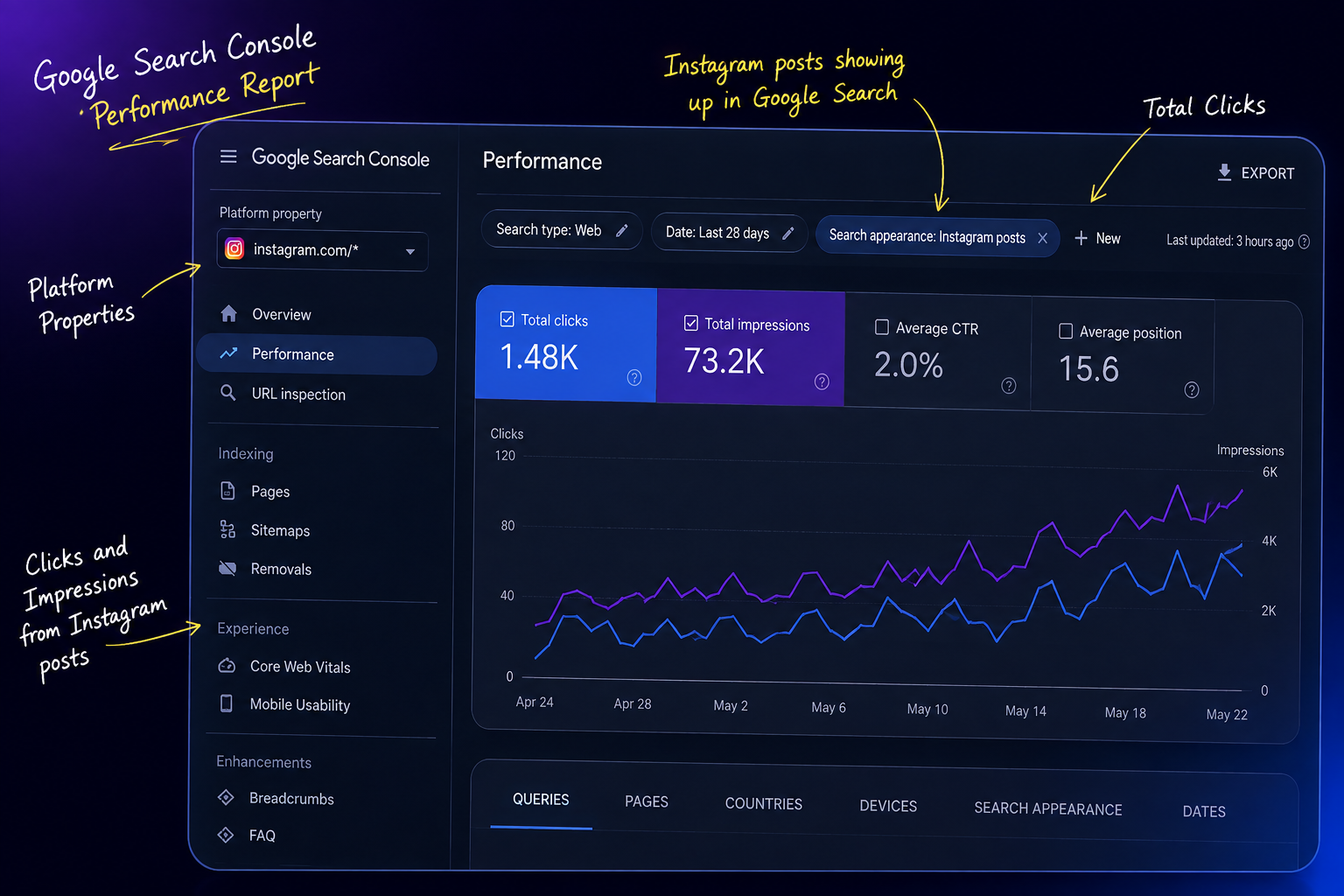
Platform properties measure how your social content performs inside Google — Search, Discover and News. They measure nothing that happens inside the Instagram or TikTok app.
Your Reel picked up 40,000 views in-app? Search Console has no idea. What it knows is different and, honestly, more useful: somebody typed a query into Google, your Reel showed up in the results, and they clicked it. That click is what gets counted.
So this is not a replacement for native analytics. It is a data set nobody had access to before.
The three reports you get
Performance report. Clicks, impressions, average CTR and average position, filterable and sortable so you can isolate which individual posts and which specific queries are pulling traffic. The data exports, which matters if you build your own dashboards.
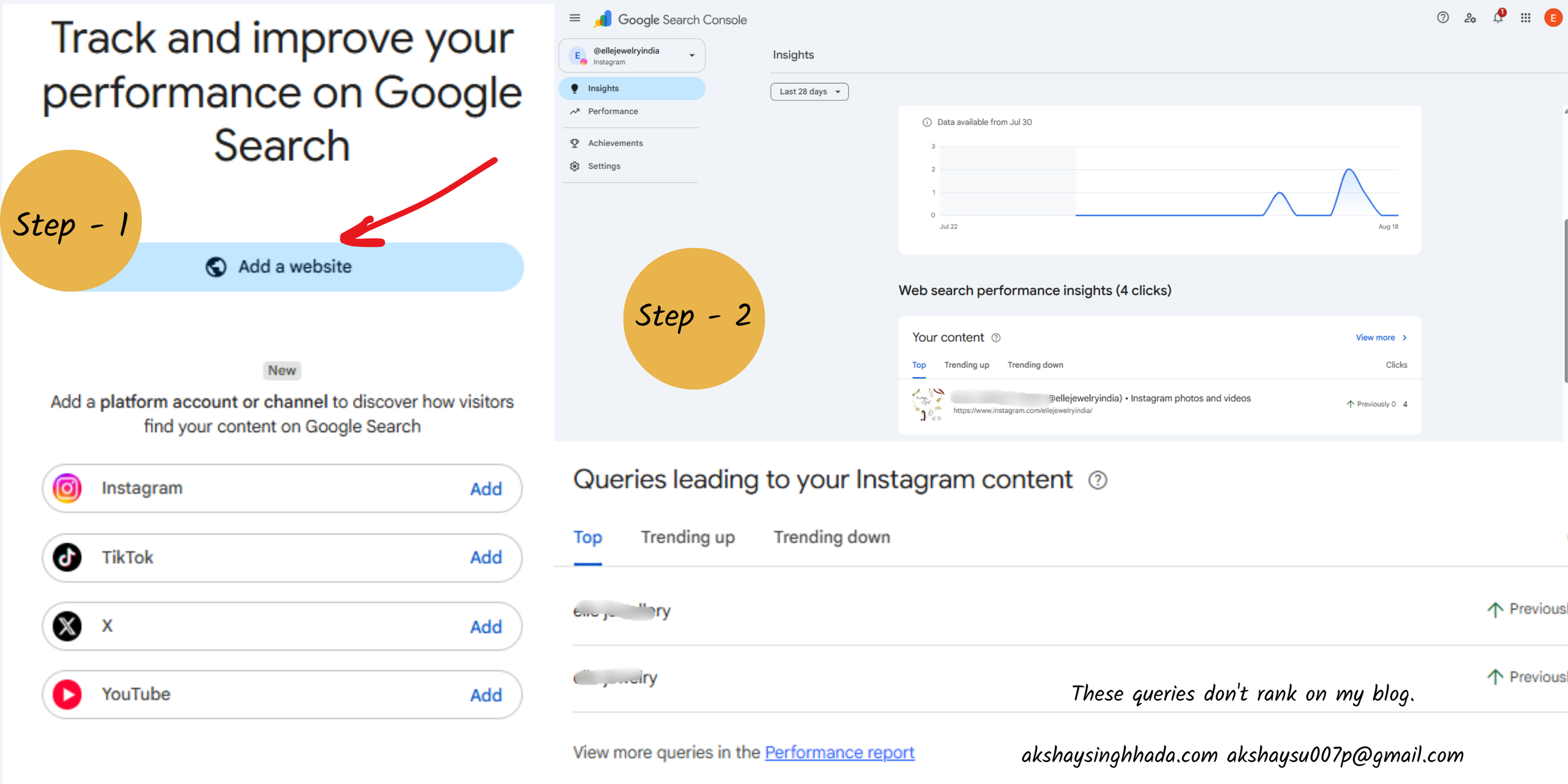
Insights report. A lighter overview covering recent traffic direction, your top-performing posts, and how people are discovering your account through Google.
Achievements. Growth milestones over a rolling window, marking click thresholds as you cross them.
How to set up a platform property
The verification step works differently from what you are used to, because you do not own the platform’s code. There is no DNS record and no HTML file to upload. You authorise the account connection instead.
- Open Search Console and click the property selector at the top left.
- Click Add property.
- Choose Platform property as the type.
- Select your platform: Instagram, TikTok, X or YouTube.
- Follow the on-screen prompts to authorise the connection securely.
That is the entire setup. It takes about four minutes per account.
What to expect in the first week
Two things will look broken and are not.
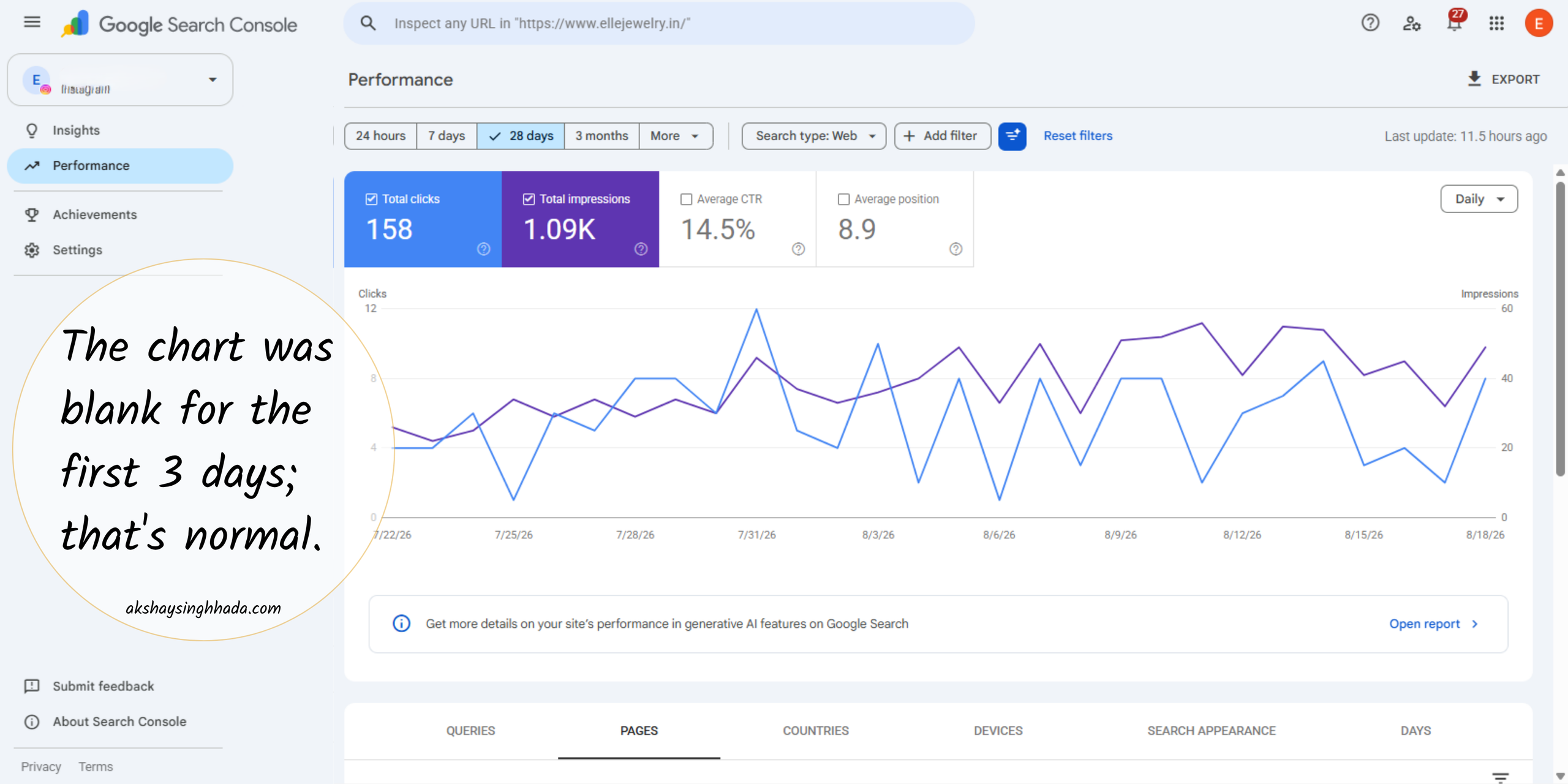
First, your charts will be blank or partial for the first few days. Google collects and processes data from the connection date forward, so there is no historical backfill. Every day you delay setup is a day of history you never get.
Second, in the Insights report the summary number at the top counts clicks across web, image, video and news search, while the detailed lists underneath cover web search only. The totals will not reconcile. That is expected behaviour, not a bug, and it has already confused a lot of people.
Who should set up Search Console platform properties first
Not every account needs this on day one. Search Console platform properties pay off fastest in three situations, and it is worth knowing which one you are in before you spend a morning on it.
Brands whose content library is bigger than their site. If you have four hundred Reels and eleven blog posts, most of your searchable surface area is not on your domain. Search Console platform properties are the only first-party way to see what that surface area is doing in Google.
Creators and consultants with a personal brand. Your name is the query. Seeing which posts Google serves when somebody searches you is direct feedback on how the algorithm understands your positioning, which is useful whether or not you sell anything from the profile.
Anyone already fighting for organic visibility in a crowded category. If your blog is stuck on page two for the terms you care about, checking whether your social posts rank for those same terms takes ten minutes and occasionally changes the whole strategy.
If none of those describe you, set it up anyway and ignore it for a quarter. The data only starts from the day you connect, so an unused property is still an appreciating asset. That is the single strongest argument for doing it now rather than when you finally need it.
One caveat before you go further: coverage across the four platforms is not identical, and early reporting from Search Engine Roundtable noted that Google had experimented with versions of this data before shipping the full property type. Treat the first few weeks of numbers as directional rather than definitive.
Five ways I use Google Search Console platform properties data
Setting it up is trivial. Getting value out of it is the part worth writing about. Here is where I start on every account.
1. Find the queries your website is losing
Pull the query list from your Instagram property. Pull the query list from your website property. Put them side by side.
Any query where a Reel ranks but your site does not is a content gap with proof attached. You are not guessing at search intent any more, you are reading a query Google has already matched to your brand. That is a blog brief that writes itself, and it is the fastest content research I have run in years.
2. Learn which post format Google actually surfaces
Carousels, Reels and Stories are not treated identically in search. Filter the Performance report by search type — Web, Image, Video — and the pattern shows up quickly.
One useful detail worth knowing: if someone clicks your video from a Google result and it plays inside Google’s own viewer rather than opening the app, it still registers as a click on your property. Stories behave the same way, showing as impressions when they appear and clicks when tapped.
Once you know which format Google prefers for your account, your content calendar stops being a coin toss.
3. Write captions for search intent, not just for the feed
Once you can see the exact queries pulling people to your posts, caption writing stops being purely creative and becomes partly a keyword exercise.
Three places carry signal: the first line of the caption, the alt text on the image, and the on-screen text in the opening frame. Most brands optimise none of them. If you are already running content anyway, this is free upside.
4. Put organic social into your acquisition reporting
If Google is sending measurable clicks to your Instagram, that belongs in the channel mix, not on a separate social slide nobody reads.
This is the political value of the feature, and I mean that in a good way. It changes how organic social gets valued internally, and it changes what you can argue for at budget time. A number Google produced is harder to dismiss than a screenshot of reach.
5. Build your query groups before the data gets big
Alongside the global rollout, Google published guidance on analysing this data, including grouping queries to understand who your search audience actually is. Do that early, while the data set is small and readable. Grouping ten thousand queries later is a different job entirely.
What platform properties will not do
Let me close the loop on the three things I have already been asked this week.
It will not improve your rankings. This is a reporting tool. Connecting a property changes nothing about how Google treats your content. Anybody selling you otherwise is selling you something.
It will not replace native analytics. In-app views, saves, shares and watch time still live inside Instagram Insights and TikTok Analytics. Different question, different tool.
It will not require a website. That one is a feature, not a limitation. As Search Engine Journal noted in its coverage, this opens Search Console to creators who have never had a verified site at all.
Why this matters more for Indian D2C brands
Here is the part I would put in front of a founder.
Search referral traffic to websites has been sliding. Independent reporting covered by PPC Land documented small publishers losing a substantial share of search referral traffic over a two-year window, with a steep drop through 2025 alone.
Meanwhile, in India, a large share of category discovery already happens on Instagram rather than on a brand’s own site. Jewellery, apparel, beauty, home — the customer meets the brand in a feed long before she meets a product page.
Put those two facts together and the picture is uncomfortable. For a lot of Indian D2C brands, the most valuable organic real estate is not the website at all. Until now there was no first-party way to prove that. Now there is, and it costs nothing but four minutes.
If you are already running paid on the same accounts, this pairs neatly with your Meta Ads scaling work — organic search demand is one of the cleanest signals you have for which creative angles deserve budget.
FAQ
Which platforms do Google Search Console platform properties support?
Instagram, TikTok, X and YouTube. Each account is added as its own separate property.
Do I need a website to use this?
No. This is the first Search Console property type that does not require domain ownership, which is why creators without any website can now use the tool.
Does it show my Instagram in-app views?
No. It only reports how your content performs in Google Search, Discover and News. Native platform analytics still cover in-app performance.
Why are my charts empty after setup?
Data collection begins from the connection date. Blank or partial charts for the first few days are normal, and there is no historical backfill.
Will connecting a platform property improve my rankings?
No. It is a measurement feature, not a ranking factor.
The takeaway
For years, SEO and social were measured in two languages that could not be translated into each other. One team reported sessions, the other reported reach, and nobody could connect them honestly.
Google Search Console platform properties give both sides the same unit: a click from Google. That is a small change on the surface and a significant one underneath.
Set it up this week. The data only accumulates forward.
I am a Digital Performance Marketing Manager who has managed ₹1 CR+ in tracked ad spend across Meta and Google Ads, building AI-driven acquisition systems for D2C and B2B brands. If you want this set up properly on your accounts, get in touch or read more about how I work.