
Key Takeaways
- From 28 October 2026, Meta switches product browsing on in ads that are already running. It is opt-out, not opt-in.
- Tapping an ad can land someone in an in-app product experience instead of your site — including product suggestions you do not control.
- Meta’s supporting evidence is a single August test across roughly 117,700 advertisers claiming an average 3% conversion lift, with the metric and comparison design undefined.
- Real account data below: a jewellery account losing 90% of shoppers between cart and checkout. Adding a layer you cannot instrument makes that leak harder to find, not easier.
- Opt out before 28 October if your funnel diagnosis is unfinished. Test it deliberately in January instead of accidentally during peak season.
Meta product browsing turns on automatically in your existing ads on 28 October 2026. You did not ask for it, and if you want the old behaviour you have to go and switch it off before that date. For most advertisers this will land in the middle of peak season, which is exactly when nobody is reading Ads Manager notices carefully.
This post covers what actually changes, what Meta’s evidence for it is worth, and the one question that decides whether you should opt out — using numbers from a live D2C account rather than a hypothetical.
What Changes on 28 October
Today, when someone taps your ad, they go to your site. After the change, they may instead land in an in-app experience on Facebook or Instagram that shows product information and product suggestions. Meta’s framing is that this “helps people learn more about your products quickly.”
Three details matter more than the headline:
- It applies to ads already running. The notice refers to “your existing ads” — the ones you launched weeks ago and have stopped checking.
- The default is on. Opting out is a thing you must do, before the date, in every account you manage.
- The scope is vague. The notice does not specify ad formats, placements or campaign objectives, and does not say whether ads created after 28 October default to it as well.
There are two controls. The Opt out button inside Meta’s own notice, and a per-ad toggle under Advantage+ Creative and Destination settings that you can change at any time. The notice button is the fast route, but it is not clear whether it covers one ad account or a whole portfolio — so if you manage several, check each one rather than assuming.
What Meta’s Evidence Actually Says
Meta justifies the change with one number: an average 3% increase in conversions, from an experiment run between 6 and 21 August 2026 across roughly 117,700 advertisers.
Read that carefully, because a lot is missing. Meta does not define which conversion metric moved. It does not describe the comparison design. It does not explain how the average was calculated across 117,700 wildly different advertisers, or how it was distributed — a 3% average could be a handful of large catalogue retailers gaining a lot while everyone else loses a little. PPC Land, which reported the notice, says it could not verify the figure.
There is also a reporting problem already surfacing. Media buyer David Herrmann reported that results coming from a collection ad were being read as creative performance — in other words, the in-app layer’s contribution was being credited to the ad itself. He asked Meta for data showing how much product browsing actually contributes. That question has not been answered publicly.
Why This Hits Considered Purchases Harder
A 3% average across 117,700 advertisers tells you nothing about your category. Product browsing removes friction before the product page. That is a gift if your bottleneck is getting people to look at products, and a problem if your bottleneck is further down.
Here is 90 days from a fine-jewellery D2C account I run paid media for in India. Figures are real and pulled from the ad account; brand and campaign identifiers are removed.
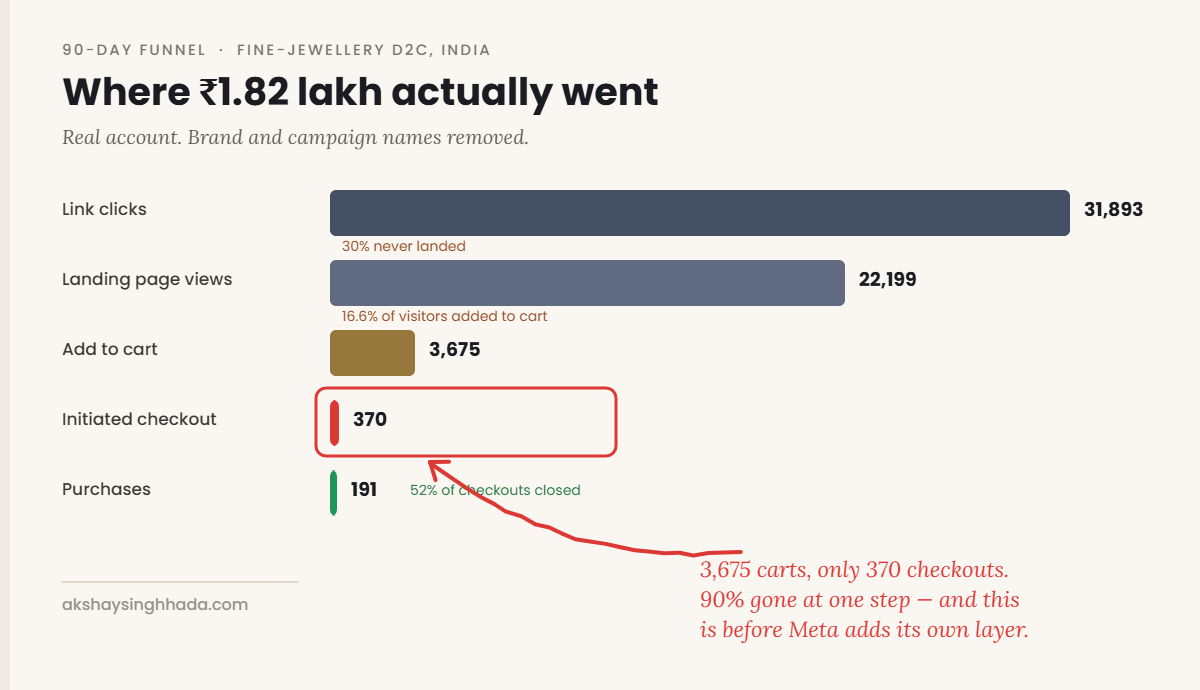
Work down that funnel. Roughly 30% of people who clicked never landed on the site at all. Of those who did, 16.6% added something to a cart. And then the account loses 90% of shoppers between cart and checkout — 3,675 add-to-carts producing just 370 initiated checkouts. Once someone actually reaches checkout, the account closes them at 52%.
That single step is worth more than the entire media budget. And it is genuinely ambiguous: either the cart-to-checkout experience is broken, or the InitiateCheckout event is not firing reliably. Those two diagnoses lead to opposite fixes, and you can only tell them apart by instrumenting every step — which is what the Meta Conversions API exists for.
Now add product browsing on top of that. Some share of traffic stops arriving on the site, which means the landing page view and add-to-cart signals thin out, which means the one leak you were trying to diagnose gets harder to see — not because it was fixed, but because fewer people now reach the part of the funnel you can measure. You would also be handing Meta’s suggestion engine a say in which products a shopper sees, in a category where a ₹2,100 average order value is a considered decision, not an impulse one.
The honest version of the other side
There is a real case for leaving it on, and it deserves stating. Mobile landing pages are slow, and a native in-app experience loads faster than most Shopify themes. If your product pages are heavy, or your site conversion rate is poor, Meta’s in-app surface may genuinely convert better than what you have built. Brands with deep, well-structured catalogues and clean feeds have the most to gain, because the suggestion engine has something good to suggest.
The question is not whether product browsing can help. It is whether you currently know enough about your own funnel to tell if it did.
How to Check and Opt Out
Do this before 28 October, per ad account:
- Check your notifications. Open Ads Manager, click the bell, filter to Ads. If Meta’s product browsing notice is there, the Opt out button inside it is your fastest route.
- Do not assume one click covers everything. If you manage multiple accounts, open each one. The notice’s scope is not documented.
- Check the per-ad setting. On live ads, look under Advantage+ Creative and Destination settings. This is where the toggle lives, and it is the only place you can confirm the actual state rather than trusting a banner.
- Record your baseline now. Before the 28th, export cost per purchase, landing page views, add-to-cart and initiated checkout for the last 30 days. Without a pre-change baseline you will have no way to argue about what happened afterwards.
- Diarise a reporting check for 29 October. Watch landing page views specifically. A sudden drop in landing page views with flat link clicks is the signature of traffic being absorbed in-app.
If an agency runs your campaigns, send them this list rather than asking them to “check the Meta thing”. Name the date and name the setting.
Opt Out, or Test It?
The answer depends on one thing: whether you currently trust your own funnel data.
| Your situation | What to do before 28 Oct |
|---|---|
| Funnel is instrumented, events verified, you know your step-by-step conversion rates | Leave it on and measure it properly. You will be able to see what it did. |
| You have an unexplained drop-off somewhere in the funnel | Opt out. Finish the diagnosis first. Do not add a variable mid-investigation. |
| Peak season is your biggest revenue window | Opt out. Test in January, when a bad fortnight costs you a fortnight and not a quarter. |
| Deep catalogue, clean feed, fast product pages, strong site conversion rate | Reasonable to keep on — this is the profile Meta’s lift is most likely drawn from. |
| Considered purchase, high AOV, few SKUs | Opt out. Suggestion engines are built for breadth you do not have. |
For the jewellery account above, the answer is opt out — not because product browsing is bad, but because there is a 90% leak sitting unexplained in the middle of the funnel. You cannot evaluate a new variable while an old one is still broken. Fix the cart-to-checkout question first, then test product browsing in January as a deliberate experiment with a holdout.
If You Keep It On, Measure It Honestly
Platform-reported conversions will not separate product browsing’s contribution from your creative’s. So do not try to settle it inside Ads Manager.
This is the same measurement discipline that applies to every automated change the platforms ship — attribution for daily decisions, incrementality for truth. I covered that stack in more depth in the 2027 guide to scaling beyond ROAS, and the allocation side of it in the budget playbook.
Frequently Asked Questions
What is Meta product browsing?
It is an in-app experience that can open when someone taps your ad on Facebook or Instagram, showing product information and product suggestions instead of sending the person straight to your website. From 28 October 2026 it is switched on by default in ads that are already running.
Do I have to do anything before 28 October?
Only if you want the old behaviour. Product browsing is opt-out, so doing nothing means it turns on. At minimum, record a 30-day performance baseline before the date so you can tell what changed afterwards.
Where is the opt-out setting?
Two places. There is an Opt out button inside Meta’s notice in Ads Manager, and a per-ad toggle under Advantage+ Creative and Destination settings that can be changed at any time. Because the notice’s account scope is not documented, check each ad account you manage rather than relying on one click.
I cannot find the notice in my account. Am I unaffected?
No. The notice appears to be rolling out gradually — one live account I checked on 21 October had nothing in roughly a week of notifications. Treat a missing notice as “not yet”, check the per-ad Destination settings directly, and look again closer to the date.
Is the 3% conversion lift real?
It is Meta’s own figure from an August 2026 test across roughly 117,700 advertisers, and it has not been independently verified. Meta has not defined the conversion metric, the comparison design, or how the average was distributed. Treat it as a directional claim from an interested party, not as a forecast for your account.
How will I know if product browsing hurt my results?
Watch landing page views against link clicks. If link clicks hold steady while landing page views fall, traffic is being absorbed in-app. Then check blended CAC from your store rather than platform ROAS, because platform reporting currently cannot separate the new layer’s contribution from your creative’s.
The Short Version
Meta product browsing is not obviously bad. It is being switched on without consent, during peak season, justified by a number nobody can check, measured by a system that currently cannot isolate its effect. Any one of those would be fine on its own. Together they mean the sensible default is to opt out, keep your baseline, and test it properly when a bad result costs you a fortnight instead of a quarter.
Open Ads Manager, check the bell, check your Destination settings, and export your 30-day numbers today. That is twenty minutes, and it is the difference between making this decision and having it made for you.